COSMOS / Parametric EqualizerIn development

Shape thespectrum.

Precision equalization. Seven filter shapes. A response you can see and touch.

Bands on stage
7 of 32
Frequency
10 Hz – 24 kHz
Gain
±24 dB
Frequency fieldDrag a node. Horizontal moves frequency, vertical moves gain.Interactive visual preview

Drag a node horizontally for frequency and vertically for gain. Arrow keys nudge frequency and gain, Shift makes larger steps, Page Up and Page Down change Q, Home resets gain.

02
Selected bandBell
120 Hz
0.0 dB
0.70

01 / The instrument

Precision where it matters.

The development build already runs the real interface: seven bands on a logarithmic field, exact values below, and a response curve calculated from the same C++ coefficients that process the audio.

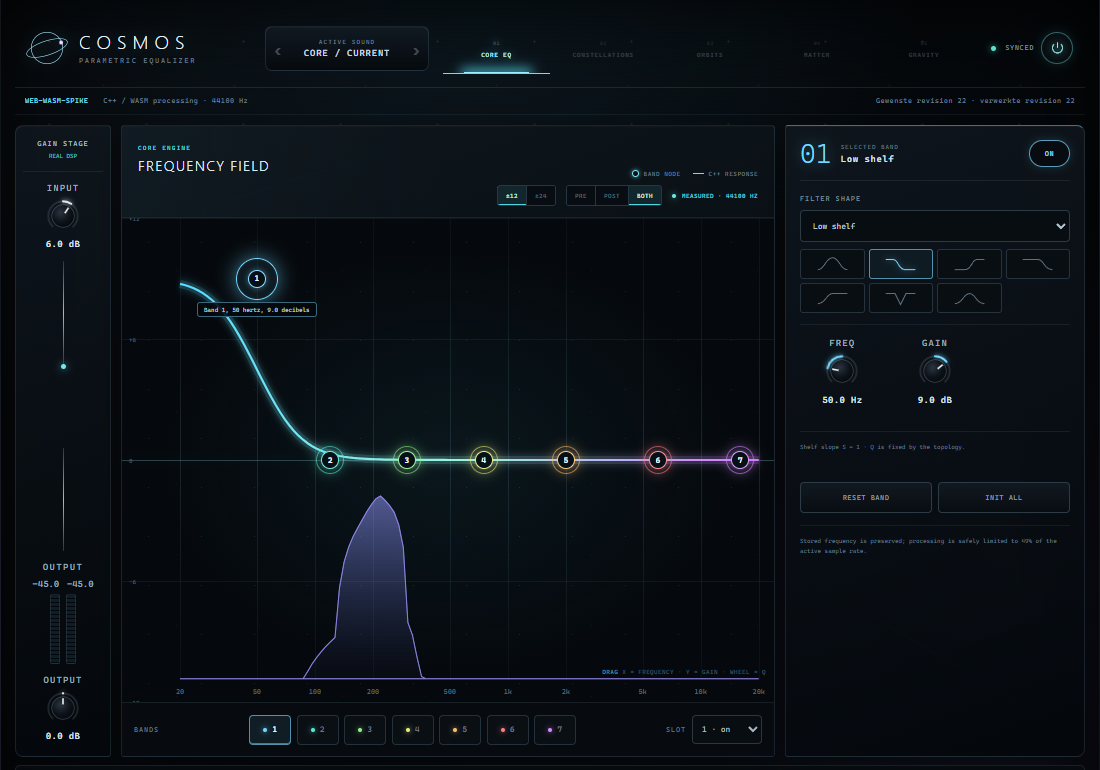
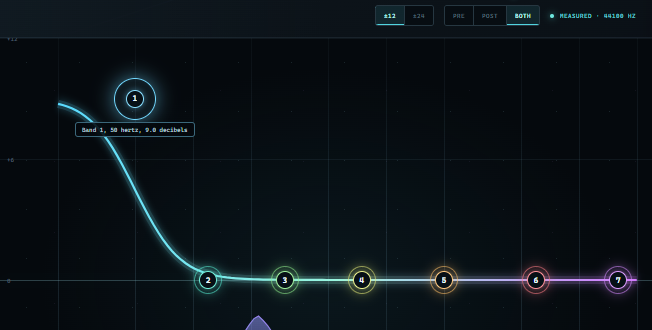
COSMOS development build in the browser: seven numbered band nodes on a logarithmic frequency field, the composite response curve, a measured post-EQ spectrum and the selected-band inspector.
In developmentDevelopment build · web/WASM target · captured 6 September 2026
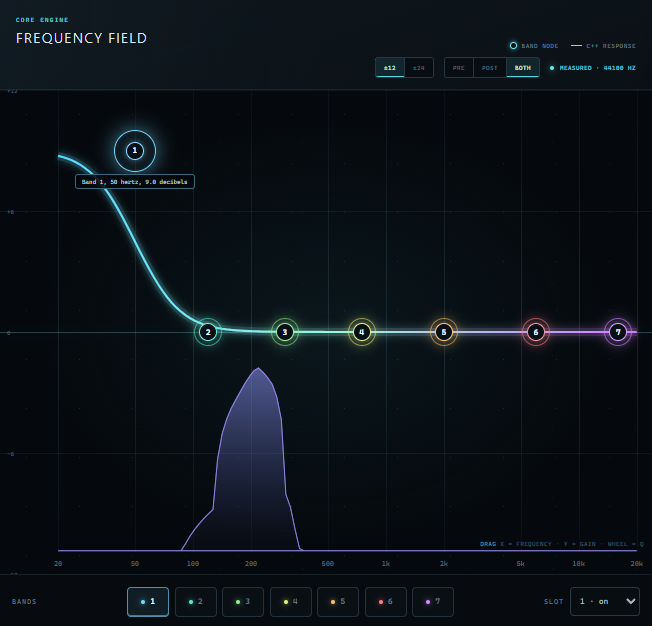
  1. Close-up of the frequency field: band node one selected on a low shelf at 50 hertz, plus nine decibels, with the response curve and a violet measured spectrum.
    01

    Frequency field

    Numbered nodes sit on the curve they shape. Drag for frequency and gain, use the wheel for Q, or type exact values.

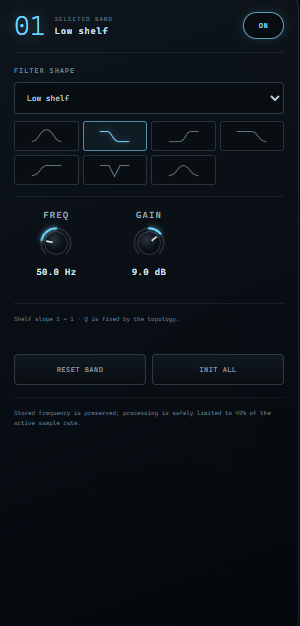
  2. Close-up of the selected-band inspector: filter shape icons, frequency and gain knobs reading 50 hertz and 9 decibels, and Reset band and Init all buttons.
    02

    Exact when you need it

    Filter shape, frequency, gain and Q for the selected band. Fields that a shape does not use are not shown as active controls.

  3. Close-up of the telemetry toolbar: plus-minus twelve and twenty-four zoom, Pre, Post and Both spectrum modes and the MEASURED 44100 hertz state.
    03

    Measured, not decorated

    Pre, Post or Both. The spectrum only appears after real samples have passed through the processor. Without audio the field stays empty.

Screenshots are from the development build on 6 September 2026. Labels, layout and behaviour may change before release.

02 / Discover

One anchor. Connected control.

The Core EQ you see above is real. What follows is the direction COSMOS is heading: a way to treat related frequencies as one shape. It is shown here as a visual concept so you can feel the idea, not as a shipped feature.

Concept · not in the current build
Constellation concept Single band · 110 Hz

Drag a node horizontally for frequency and vertically for gain. Arrow keys nudge frequency and gain, Shift makes larger steps, Page Up and Page Down change Q, Home resets gain.

110 Hz
+5.0 dB
Partials
  1. Step 1 · Today

    Start with one band.

    A bell at 110 Hz, a few decibels up. Precise, ordinary, and exactly what the Core EQ does now. Every value you drag is a value you could type.

  2. Step 2 · Planned

    Link the partials.

    Choose that band as the anchor and its harmonic neighbours appear at 220, 330, 440 Hz and beyond. One linked gain moves the whole family while each member keeps its own musical position.

  3. Step 3 · Planned

    Move the anchor, keep the shape.

    Slide the anchor and every member follows as a multiple of the new root. The EQ curve moves as one constellation. This changes where the filters sit; it does not change the pitch of the audio.

Constellation Nodes are documented as the next Core milestone after the current EQ work. The product contract currently reports the capability as unavailable.

03 / Core EQ

Built as an instrument, measured like one.

Everything in this section exists in the development builds today. It is listed with its status so you know exactly what is being described.

Seven shapes. One field.

In development

Bell, low shelf, high shelf, low-pass, high-pass, notch and band-pass. Cuts run at 12, 24 or 48 dB per octave with Butterworth alignment, so a single slope reads as one clean roll-off.

  • Bell +9 dB, Q 1.2
  • Low shelf +8 dB
  • High shelf −8 dB
  • Low-pass 12 dB/oct 24 dB/oct 48 dB/oct
  • High-pass 12 dB/oct 24 dB/oct 48 dB/oct
  • Notch Q 2.5
  • Band-pass Q 1.5

Thirty-two slots. Seven on stage.

In development

Seven bands are active at start: a low shelf at 50 Hz, bells through the midrange and a high shelf at 16 kHz. Twenty-five more wait in reserve. A slot keeps its identity, and its automation ID, whether it is on, off or moved.

Active at InitReserve slot

Close-up of the telemetry toolbar: plus-minus twelve and twenty-four zoom, Pre, Post and Both spectrum modes and the MEASURED 44100 hertz state.Development build · measured 44.1 kHz

The curve you see is the curve you hear.

In development

The response line is calculated from the same coefficient description the processor uses. The analyzer draws a 1024-sample measurement of real audio as 128 points, before or after the EQ, and stays empty until real audio arrives.

Glides, not clicks.

In development

Frequency, gain and Q ramp over 10 milliseconds. Switching a filter shape crossfades two filter paths over 20 milliseconds, so automation and live tweaks stay musical.

Frequency / gain / Q
10 ms ramp
Shape change
20 ms crossfade
Enable / bypass
10 ms wet ramp

State that holds.

In development
Init
Restores the neutral seven-band start state.
Undo / redo
Every change runs through one control path, so history is exact.
Whole-state recall
A preset is validated completely before it is applied. No half-restored patches.
Input / output trim
Gain staging around the EQ, smoothed like every other parameter.

04 / Direction

Ideas in orbit.

Four systems have been explored on paper and reserved in the product contract. None of them process audio in the current build. They are shown here so the direction is clear, not to sell a roadmap.

  • Constellation Nodes

    Planned

    Link EQ bands to a root as harmonic partials or fixed ratios. Moves filter settings, never the audio pitch.

  • Orbital EQ

    Planned

    Draw one path through frequency, gain and Q and let a band travel it in time.

  • Spectral Matter / Anti-Matter

    Concept

    Capture a spectral fingerprint and emphasise, suppress or transfer it. Research stage.

  • Spectral Gravity

    Concept

    Attract or repel spectral components around a point. Requires spectral processing that is still being evaluated.

05 / Formats

One C++ core. Three targets.

Development builds exist for each target below and run the same processor. Nothing is publicly released yet. Formats, operating systems and prices that are not listed have not been announced.

  • VST3WindowsIn development

    Plug-in for use inside a DAW. Development build passes pluginval at strictness level 5.

  • StandaloneWindowsIn development

    Desktop application that plays a loaded WAV through the same processor.

  • WebBrowser (WebAssembly)In development

    Browser build on the same C++ core via AudioWorklet. Requires WebAssembly SIMD.

No price, release date or supported operating systems beyond the development targets have been announced.

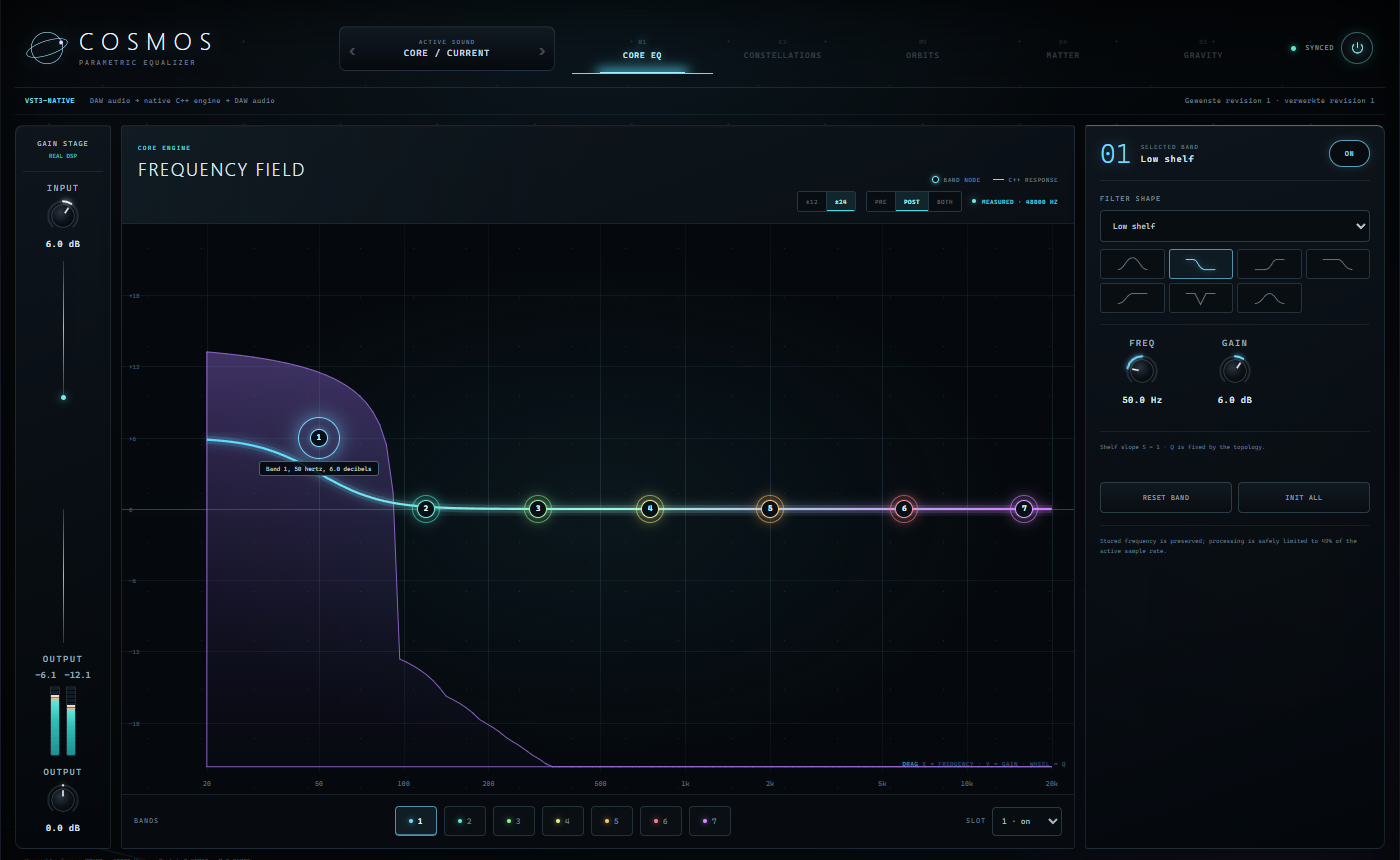
COSMOS development build running as a VST3 editor: the same frequency field with a low shelf on band one and a measured post spectrum.
Development build · VST3 target on Windows · captured 6 September 2026

07 / Ecosystem

Source. Destruction. Spectrum.

COSMOS shares its architecture with DARKSTAR and QUASSAR: an Angular interface on a C++ processing core. Together they cover where a sound starts, how it breaks and how it is shaped. The chain below is an example, not a required routing.

  1. SourceDARKSTARHybrid Digital SynthesizerVisit site ↗
  2. DistortionQUASSARMultiband Destruction EngineVisit site ↗
  3. SpectrumCOSMOSParametric EqualizerYou are here

Illustration only. No audio passes through this diagram.

08 / Status

In development, in the open about it.

COSMOS is a working Core EQ in development builds for Windows and the browser. There is no release date, price or public download yet. What you can do today is try the preview and follow the family.

Status
In development
Release date
Not announced
Price
Not announced

A launch list is not open yet.

09 / FAQ

Straight answers.

What is COSMOS?

COSMOS is a parametric equalizer being developed alongside DARKSTAR (a synthesizer) and QUASSAR (a distortion effect). The current development build is a seven-band Core EQ with 32 fixed slots, seven filter shapes, a response curve from the processing core and a pre/post analyzer.

Can I buy or download it?

Not yet. Development builds exist for Windows VST3, Windows standalone and the browser, but none is publicly released. There is no price, release date or launch list at the moment.

Which formats and platforms are planned?

The development builds target VST3 on Windows, a Windows standalone application and a WebAssembly browser build. Other formats or operating systems have not been announced.

Is the preview on this page the real plug-in?

No. The interactive preview is a visual model that mirrors the interface and the filter shapes so you can feel the controls. It does not process audio and it is not the product DSP. The screenshots in the Interface section are from the real development build.

Does COSMOS have harmonic or constellation control?

Not in the current build. Constellation Nodes are documented as the next planned Core feature after the current EQ work, and the product contract reports the capability as unavailable today. The Discover section shows the idea as a labelled concept.

Does the EQ add latency?

The Core EQ uses minimum-phase IIR filters without lookahead, so it adds no buffer delay. Like any recursive filter it can ring out briefly after the input stops, which the plug-in reports to the host as a tail.

How does COSMOS relate to DARKSTAR and QUASSAR?

They share one architecture: an Angular interface on a C++ processing core with native and web targets. DARKSTAR creates sound, QUASSAR distorts it, COSMOS shapes its spectrum. They are separate products; you do not need one to use another.